
CollegeConnect
CollegeConnect
CollegeConnect
2021
2021
Social
Social
College Life
College Life
Educational
Educational
A localized social media platform designed for creating those ever-so-important surface-level connections that can open the door to deeper relationships.
A localized social media platform designed for creating those ever-so-important surface-level connections that can open the door to deeper relationships.
A localized social media platform designed for creating those ever-so-important surface-level connections that can open the door to deeper relationships.
THE TASK
Our team was tasked with redesigning an already functioning social media platform, to solve a problem that we saw in our own lives. We chose Nextdoor, which had a niche community we could utilize to tackle our issue and subsequently narrow down our target audience.
THE TASK
Our team was tasked with redesigning an already functioning social media platform, to solve a problem that we saw in our own lives. We chose Nextdoor, which had a niche community we could utilize to tackle our issue and subsequently narrow down our target audience.
THE PROBLEM
The problem we chose to tackle was prevalent in our daily lives as students of UC San Diego, which was the dying social life in the light of a pandemic. We wanted to make a middle ground between personal and business social platforms that students could use to make surface-level connections.
THE PROBLEM
The problem we chose to tackle was prevalent in our daily lives as students of UC San Diego, which was the dying social life in the light of a pandemic. We wanted to make a middle ground between personal and business social platforms that students could use to make surface-level connections.
THE GOAL
With Nextdoor, we saw a way to socially connect students on a much more surface level, while still providing methods of deepening the relationship if they saw fit. We wanted them to be able to find students in the same class, dorm, or major easily without needing to scour other social media platforms.
THE GOAL
With Nextdoor, we saw a way to socially connect students on a much more surface level, while still providing methods of deepening the relationship if they saw fit. We wanted them to be able to find students in the same class, dorm, or major easily without needing to scour other social media platforms.
STAGE 1
STAGE 1
STAGE 1
Research
Research
Research
The first step in our project was researching our competition and analyzing their strengths and weaknesses. Due to the nature of our redesign, we narrowed down our analysis to focus on social apps we already used or had heard about.
The first step in our project was researching our competition and analyzing their strengths and weaknesses. Due to the nature of our redesign, we narrowed down our analysis to focus on social apps we already used or had heard about.
The first step in our project was researching our competition and analyzing their strengths and weaknesses. Due to the nature of our redesign, we narrowed down our analysis to focus on social apps we already used or had heard about.
Competitive analysis
Competitive analysis
Competitive analysis
We used a matrix to analyze and assess our competition. Our team decided to split them up into two categories: Geosocial Apps, such as Nextdoor, Bumble, and Tinder, and Social Messaging Apps, such as Reddit, Discord, and Instagram.
We used a matrix to analyze and assess our competition. Our team decided to split them up into two categories: Geosocial Apps, such as Nextdoor, Bumble, and Tinder, and Social Messaging Apps, such as Reddit, Discord, and Instagram.
We used a matrix to analyze and assess our competition. Our team decided to split them up into two categories: Geosocial Apps, such as Nextdoor, Bumble, and Tinder, and Social Messaging Apps, such as Reddit, Discord, and Instagram.
Geosocial apps
Nextdoor · Bumble · Tinder
Great at local discovery. We borrowed Nextdoor’s community model and made it about campus.
Geosocial apps
Nextdoor · Bumble · Tinder
Great at local discovery. We borrowed Nextdoor’s community model and made it about campus.
Social messaging apps
Reddit · Discord · Instagram
Great at staying in touch. We brought over group chats and direct messages.
Social messaging apps
Reddit · Discord · Instagram
Great at staying in touch. We brought over group chats and direct messages.


The full matrices.
The full matrices.
Interviews, Round 1
Interviews, Round 1
Interviews, Round 1
We moved on to our first round of interviews to assess what our pool of users wanted out of an app such as CollegeConnect, and how they hoped to achieve those goals. Due to COVID-19, we conducted our interviews virtually over Zoom, and while not as ideal and in-person interviews, managed to secure us plenty of useful data.
We moved on to our first round of interviews to assess what our pool of users wanted out of an app such as CollegeConnect, and how they hoped to achieve those goals. Due to COVID-19, we conducted our interviews virtually over Zoom, and while not as ideal and in-person interviews, managed to secure us plenty of useful data.
We moved on to our first round of interviews to assess what our pool of users wanted out of an app such as CollegeConnect, and how they hoped to achieve those goals. Due to COVID-19, we conducted our interviews virtually over Zoom, and while not as ideal and in-person interviews, managed to secure us plenty of useful data.
ROUND 1 · OVER ZOOM
We asked how students made and kept friends, online and off, before and during the pandemic.
We asked how students made and kept friends, online and off, before and during the pandemic.
How has making friends in college been during the pandemic?
How do you keep up with friends you can’t see in person?
Have you used an app to meet people? How did it go?
What do you look for on someone’s profile?
Personas
Personas
Personas
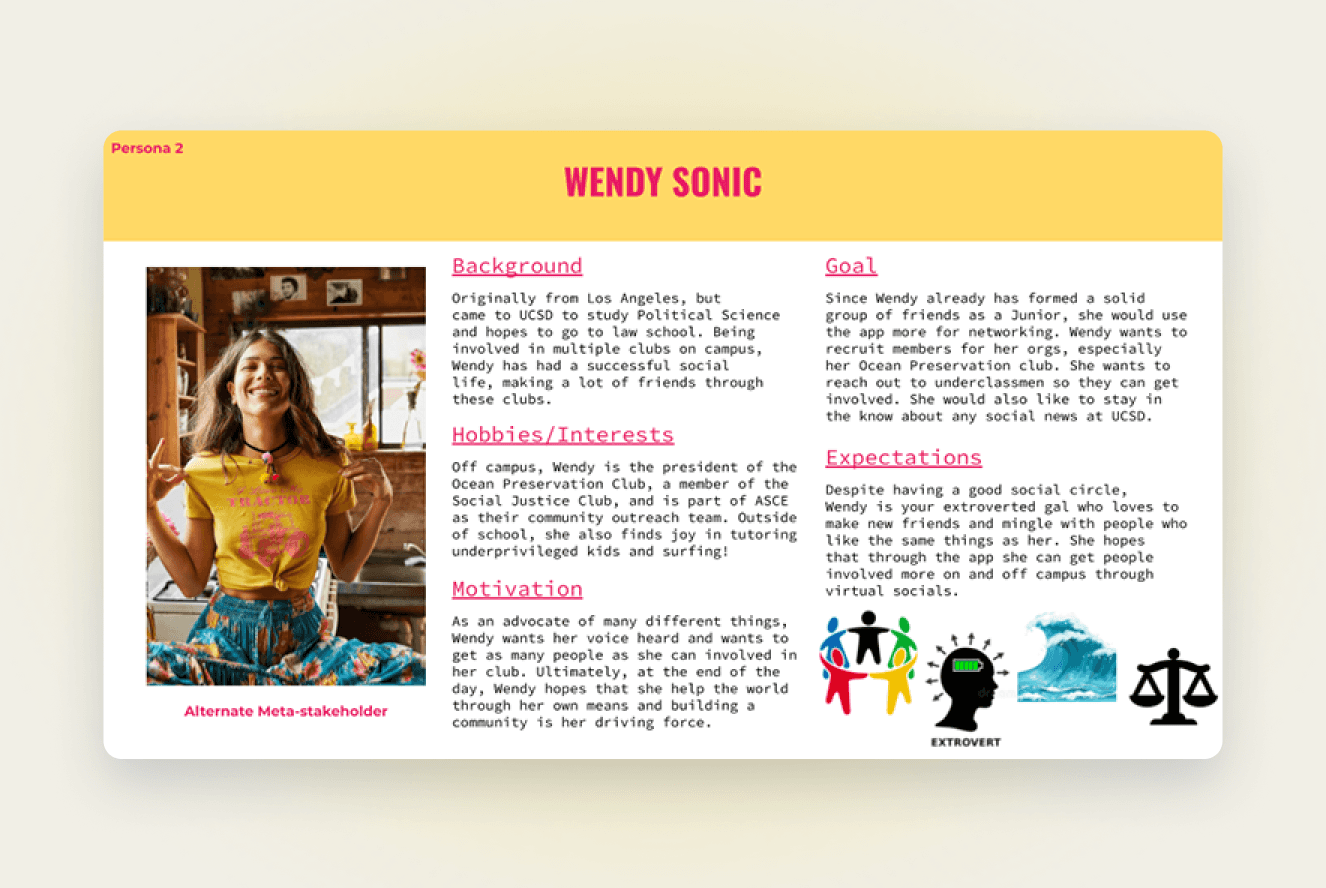
The final step in our first stage was creating user personas to help further guide our project in its future renditions. We made a total of 2 personas which we felt encompassed two major types of users - the incoming freshman who was looking to make friends, and an already socially involved junior looking to recruit.
The final step in our first stage was creating user personas to help further guide our project in its future renditions. We made a total of 2 personas which we felt encompassed two major types of users - the incoming freshman who was looking to make friends, and an already socially involved junior looking to recruit.
The final step in our first stage was creating user personas to help further guide our project in its future renditions. We made a total of 2 personas which we felt encompassed two major types of users - the incoming freshman who was looking to make friends, and an already socially involved junior looking to recruit.

Some copy about personas.
Some copy about personas.
STAGE 2
STAGE 2
STAGE 2
Prototyping
Prototyping
Prototyping
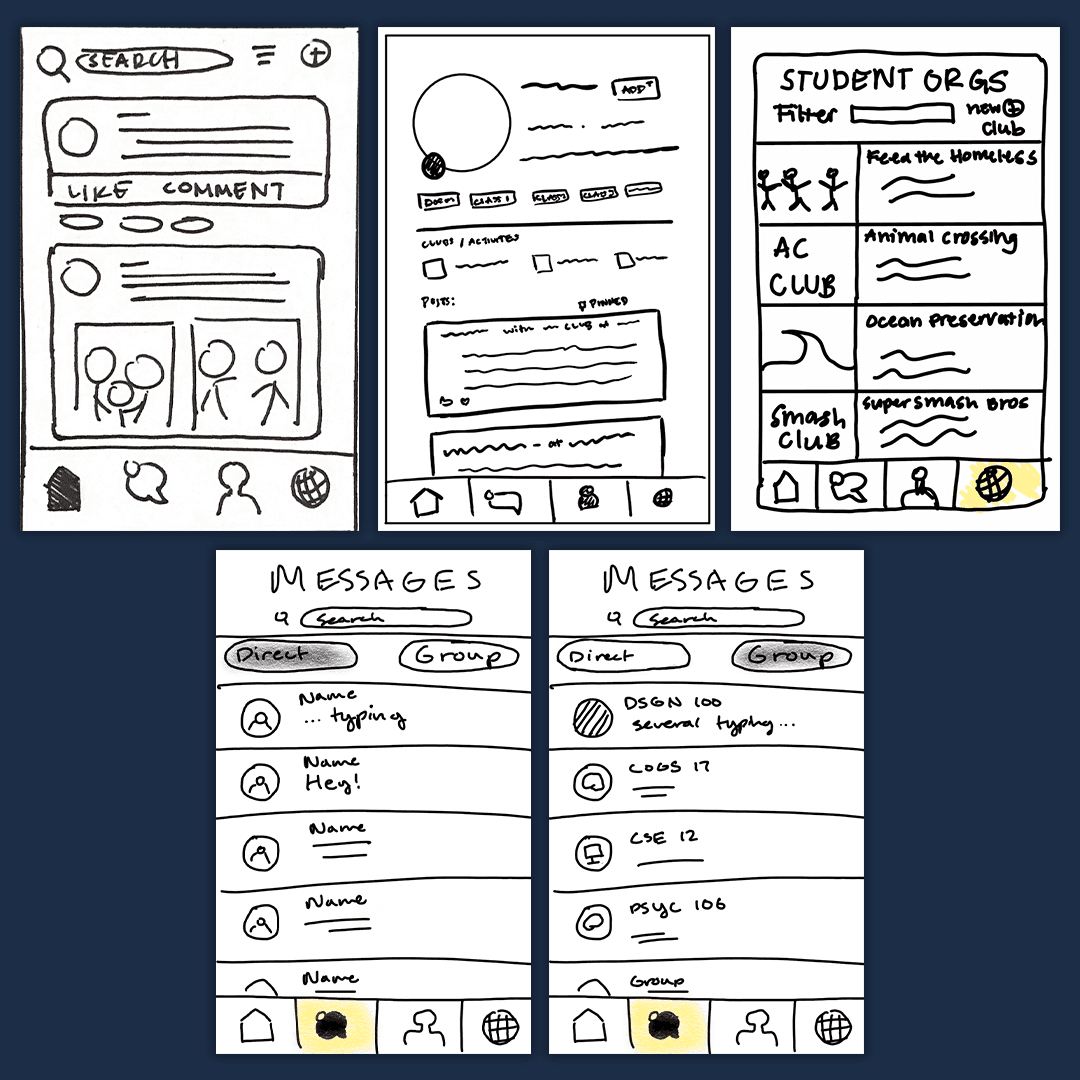
After we had gained considerable insight into our competitors, users, and what type of features we wanted to target, it was time to begin prototyping. This stage consisted of storyboards, wireframe sketches, and ultimately a low-fidelity prototype UI made in Figma.
After we had gained considerable insight into our competitors, users, and what type of features we wanted to target, it was time to begin prototyping. This stage consisted of storyboards, wireframe sketches, and ultimately a low-fidelity prototype UI made in Figma.
After we had gained considerable insight into our competitors, users, and what type of features we wanted to target, it was time to begin prototyping. This stage consisted of storyboards, wireframe sketches, and ultimately a low-fidelity prototype UI made in Figma.
Storyboards
Storyboards
Storyboards

Sketches
Sketches
Sketches
Low-fidelity prototype
Low-fidelity prototype
Low-fidelity prototype


Interviews, Round 2
Interviews, Round 2
Interviews, Round 2
After finishing up our low-fidelity prototype, we were on to our second round of interviews. We focused heavily on user experience in tandem with Nielsen’s heuristics to gauge how successful users were in completing each task.
The interviews were again held over Zoom due to COVID-19, which actually came in handy since it allowed us to record our interviewee’s screens to look back on their struggles when changing the prototype.
After finishing up our low-fidelity prototype, we were on to our second round of interviews. We focused heavily on user experience in tandem with Nielsen’s heuristics to gauge how successful users were in completing each task.
The interviews were again held over Zoom due to COVID-19, which actually came in handy since it allowed us to record our interviewee’s screens to look back on their struggles when changing the prototype.
After finishing up our low-fidelity prototype, we were on to our second round of interviews. We focused heavily on user experience in tandem with Nielsen’s heuristics to gauge how successful users were in completing each task.
The interviews were again held over Zoom due to COVID-19, which actually came in handy since it allowed us to record our interviewee’s screens to look back on their struggles when changing the prototype.
ROUND 2 · TASK-BASED TESTING
We kept a hands-off approach and checked results against Nielsen’s heuristics. Recording over Zoom let us rewatch every struggle.
We kept a hands-off approach and checked results against Nielsen’s heuristics. Recording over Zoom let us rewatch every struggle.
Find the DSGN 100 group chat.
Find school organizations related to coding.
Could you see yourself making real friends here?
How concerned are you about privacy on this app?
STAGE 3
STAGE 3
STAGE 3
High-fidelity
High-fidelity
High-fidelity
After another round of interviews and numerous changes to the prototype, we finally arrived at the high-fidelity stage. Here we focused on adding the finer details to our prototype, along with creating a stylesheet and adding color.
After another round of interviews and numerous changes to the prototype, we finally arrived at the high-fidelity stage. Here we focused on adding the finer details to our prototype, along with creating a stylesheet and adding color.
After another round of interviews and numerous changes to the prototype, we finally arrived at the high-fidelity stage. Here we focused on adding the finer details to our prototype, along with creating a stylesheet and adding color.
Stylesheet
Stylesheet
Stylesheet
We decided to allow the university to control the main colors for Collegeconnect, in a similar way to how Canvas handles it’s color scheme. For UCSD, we chose the university blue and yellow that it’s students would find familiar. We also chose a font family, Lato, that would help standardize the app across schools.
We decided to allow the university to control the main colors for Collegeconnect, in a similar way to how Canvas handles it’s color scheme. For UCSD, we chose the university blue and yellow that it’s students would find familiar. We also chose a font family, Lato, that would help standardize the app across schools.
We decided to allow the university to control the main colors for Collegeconnect, in a similar way to how Canvas handles it’s color scheme. For UCSD, we chose the university blue and yellow that it’s students would find familiar. We also chose a font family, Lato, that would help standardize the app across schools.
Colors
#162947
#F2CE19
#8E9AA6
#FFFFFF
#111111
Typography
Lato · Bold Italic for headings
Lato · Bold for subheadings
Icons
home
groups
buy/sell
notifications
more
search
message
add
High-fidelity prototype
High-fidelity prototype
High-fidelity prototype

Home
CollegeConnect’s homepage was designed to show the user as much pertinent information as possible at once. We wanted to ensure that every time a user opened their app, they were shown something useful on this screen. This example includes a post from a classmate and also includes a search section.
Home
CollegeConnect’s homepage was designed to show the user as much pertinent information as possible at once. We wanted to ensure that every time a user opened their app, they were shown something useful on this screen. This example includes a post from a classmate and also includes a search section.
Profile
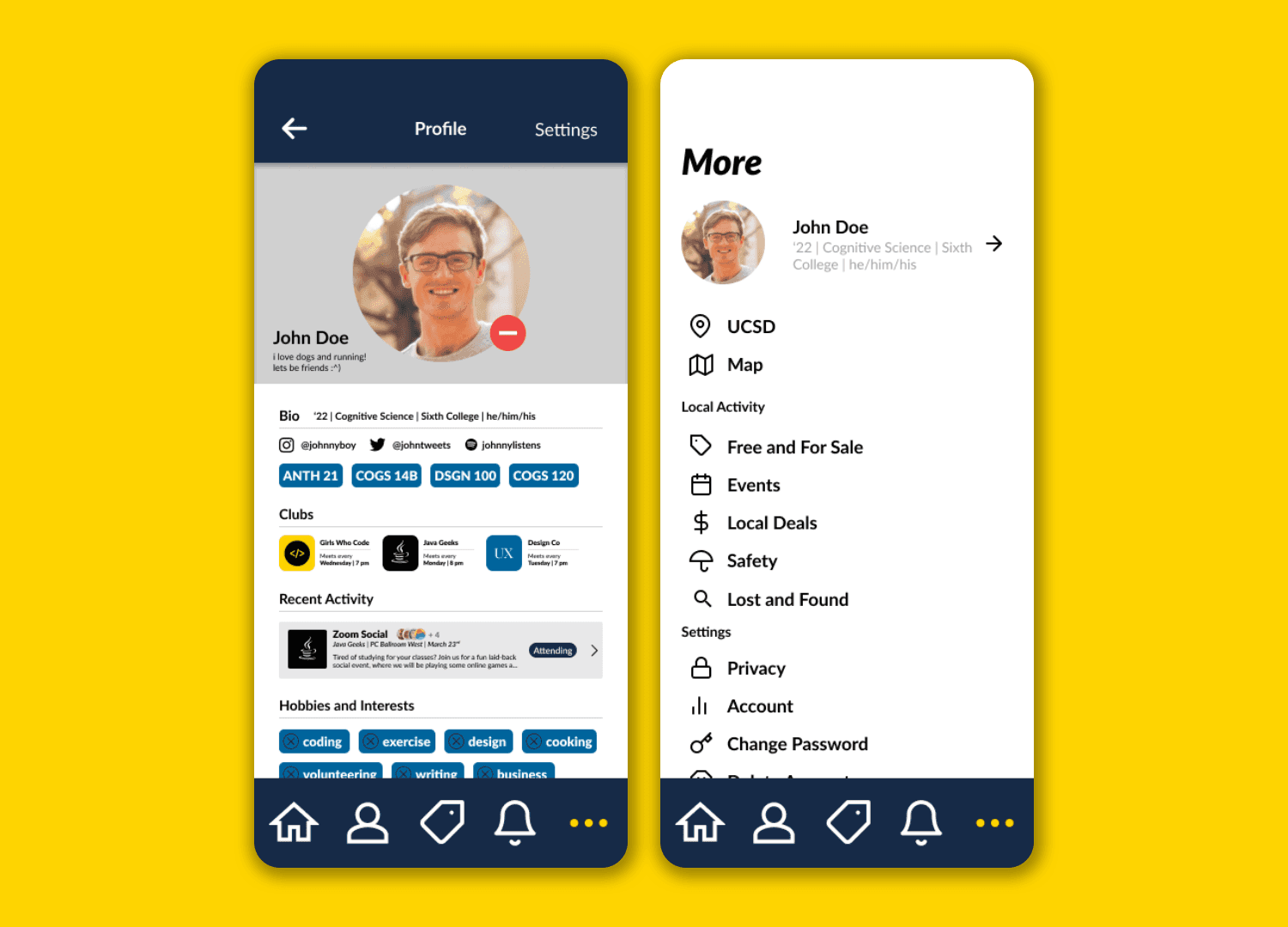
Collegeconnect’s profile displayed our user’s most optimal interests to try and facilitate a real connection between the two parties. Collegeconnect prioritizes user safety and offers users full control over their own profiles.
Profile
Collegeconnect’s profile displayed our user’s most optimal interests to try and facilitate a real connection between the two parties. Collegeconnect prioritizes user safety and offers users full control over their own profiles.

Messaging
Our theory behind the messaging interface was the tried and true testament of “simple is best” - simple to read and accessible UI is often all messaging needs. While it is important for College to connect to foster relationships, ultimately we want the users to use their own means of communication.
Messaging
Our theory behind the messaging interface was the tried and true testament of “simple is best” - simple to read and accessible UI is often all messaging needs. While it is important for College to connect to foster relationships, ultimately we want the users to use their own means of communication.
Clubs
Student organizations are often the lifeblood of socialization at many universities around the world. Collegeconnect offers our user’s a fast and efficient method to find and contact the organizations that they are interested in. This in turn also helps the collective social community at the university to grow as well.
Clubs
Student organizations are often the lifeblood of socialization at many universities around the world. Collegeconnect offers our user’s a fast and efficient method to find and contact the organizations that they are interested in. This in turn also helps the collective social community at the university to grow as well.

Interviews, Round 3
Interviews, Round 3
Interviews, Round 3
To wrap up our project, we ran one final round of interviews using the latest high-fidelity prototype. We focused primary on the look and feel of the user interface, along with getting insight into how polished it felt to the users both visually and in practice.
To wrap up our project, we ran one final round of interviews using the latest high-fidelity prototype. We focused primary on the look and feel of the user interface, along with getting insight into how polished it felt to the users both visually and in practice.
To wrap up our project, we ran one final round of interviews using the latest high-fidelity prototype. We focused primary on the look and feel of the user interface, along with getting insight into how polished it felt to the users both visually and in practice.
ROUND 3 · FINAL TESTING
We repeated the tasks with the hi-fi prototype, this time focusing on how the experience felt.
We repeated the tasks with the hi-fi prototype, this time focusing on how the experience felt.
Was the tagging system helpful or in the way?
What do you think of splitting individual and group chats?
How is this different from other social apps?
Looking back
Looking back
Looking back
This was the biggest project I’d taken on at the time, and I’m proud of where it landed.
This was the biggest project I’d taken on at the time, and I’m proud of where it landed.
This was the biggest project I’d taken on at the time, and I’m proud of where it landed.
What we did right
Privacy: interviewees were amenable to sharing their information on an app like this, since it would be limited to college students
Use of Nextdoor: interviewees thought it was a smart way to incorporate features they liked
Interaction: many said that they would use this to find clubs and interact
What we did right
Privacy: interviewees were amenable to sharing their information on an app like this, since it would be limited to college students
Use of Nextdoor: interviewees thought it was a smart way to incorporate features they liked
Interaction: many said that they would use this to find clubs and interact
What still needs work
Confusion over tagging differences on homepage and clubs page and lack of generalized tags: reorganization of the tag system
Making sure our clickable prototype was thorough: users wanted to be able to click on all working features
Addition of relevant info, like pronouns.
What still needs work
Confusion over tagging differences on homepage and clubs page and lack of generalized tags: reorganization of the tag system
Making sure our clickable prototype was thorough: users wanted to be able to click on all working features
Addition of relevant info, like pronouns.