Openn

Openn

April 2024 - January 2025

April 2024 - January 2025

Real Estate

Real Estate

Openn Negotiations

Openn Negotiations

A digital real estate platform designed for agent ease of use.

A digital real estate platform designed for agent ease of use.

01 — Research

User Research

After my initial introduction at Openn, I quickly realized they were extremely lacking in user research and stakeholder development.

Research is the foundation of my design process, so I made research a priority at my time here.

01 — Research

User Research

After my initial introduction at Openn, I quickly realized they were extremely lacking in user research and stakeholder development.

Research is the foundation of my design process, so I made research a priority at my time here.

Personas

Personas

Utilizing user data compiled by focus groups and customer support data, I created multiple user personas to help facilitate a baseline stakeholder group for all current and future designs.

I also cultivated the idea of stakeholder reliance at Openn, showcasing a unique situation where users’ needs and vulnerabilities directly impacted each other.

All sensitive information is blurred in terms with NDA.

Bob: Buyer

Education

Experience

Likes

[COPY: likes]

Dislikes

[COPY: dislikes]

Trusts information from

[COPY: trusted sources]

Influence

[COPY: influence]

Background

[COPY: background, ~40 words]

Goals
  1. [COPY: goal 1]

    • [COPY: detail]

    • [COPY: detail]

  2. [COPY: goal 2]

    • [COPY: detail]

Questions

[COPY: questions, ~25 words]

Responsibilities

[COPY: responsibilities, ~25 words]

Blockers

[COPY: blockers, ~25 words]

Tech Skills

[COPY: tech skills]

Natasha: Buyer Agent

Education

Experience

Likes

[COPY: likes]

Dislikes

[COPY: dislikes]

Trusts information from

Themselves, Internet

Influence

[COPY: influence]

Background

[COPY: background, ~40 words]

Goals
  1. [COPY: goal 1]

    • [COPY: detail]

    • [COPY: detail]

  2. [COPY: goal 2]

    • [COPY: detail]

Questions

[COPY: questions, ~25 words]

Responsibilities

[COPY: responsibilities, ~25 words]

Blockers

[COPY: blockers, ~25 words]

Tech Skills

[COPY: tech skills]

Wendy: Seller

Education

Experience

Likes

[COPY: likes]

Dislikes

[COPY: dislikes]

Trusts information from

List Agent

Influence

[COPY: influence]

Background

[COPY: background, ~40 words]

Goals
  1. [COPY: goal 1]

    • [COPY: detail]

    • [COPY: detail]

  2. [COPY: goal 2]

    • [COPY: detail]

Questions

[COPY: questions, ~25 words]

Responsibilities

[COPY: responsibilities, ~25 words]

Blockers

[COPY: blockers, ~25 words]

Tech Skills

[COPY: tech skills]

Openn Admin

Education

Experience

Likes

[COPY: likes]

Dislikes

[COPY: dislikes]

Trusts information from

[COPY: trusted sources]

Influence

[COPY: influence]

Background

[COPY: background, ~40 words]

Goals
  1. [COPY: goal 1]

    • [COPY: detail]

    • [COPY: detail]

  2. [COPY: goal 2]

    • [COPY: detail]

Questions

[COPY: questions, ~25 words]

Responsibilities

[COPY: responsibilities, ~25 words]

Blockers

[COPY: blockers, ~25 words]

Tech Skills

[COPY: tech skills]

Bob: Buyer

Education

Experience

Likes

[COPY: likes]

Dislikes

[COPY: dislikes]

Trusts information from

[COPY: trusted sources]

Influence

[COPY: influence]

Background

[COPY: background, ~40 words]

Goals
  1. [COPY: goal 1]

    • [COPY: detail]

    • [COPY: detail]

  2. [COPY: goal 2]

    • [COPY: detail]

Questions

[COPY: questions, ~25 words]

Responsibilities

[COPY: responsibilities, ~25 words]

Blockers

[COPY: blockers, ~25 words]

Tech Skills

[COPY: tech skills]

Natasha: Buyer Agent

Education

Experience

Likes

[COPY: likes]

Dislikes

[COPY: dislikes]

Trusts information from

Themselves, Internet

Influence

[COPY: influence]

Background

[COPY: background, ~40 words]

Goals
  1. [COPY: goal 1]

    • [COPY: detail]

    • [COPY: detail]

  2. [COPY: goal 2]

    • [COPY: detail]

Questions

[COPY: questions, ~25 words]

Responsibilities

[COPY: responsibilities, ~25 words]

Blockers

[COPY: blockers, ~25 words]

Tech Skills

[COPY: tech skills]

Wendy: Seller

Education

Experience

Likes

[COPY: likes]

Dislikes

[COPY: dislikes]

Trusts information from

List Agent

Influence

[COPY: influence]

Background

[COPY: background, ~40 words]

Goals
  1. [COPY: goal 1]

    • [COPY: detail]

    • [COPY: detail]

  2. [COPY: goal 2]

    • [COPY: detail]

Questions

[COPY: questions, ~25 words]

Responsibilities

[COPY: responsibilities, ~25 words]

Blockers

[COPY: blockers, ~25 words]

Tech Skills

[COPY: tech skills]

Openn Admin

Education

Experience

Likes

[COPY: likes]

Dislikes

[COPY: dislikes]

Trusts information from

[COPY: trusted sources]

Influence

[COPY: influence]

Background

[COPY: background, ~40 words]

Goals
  1. [COPY: goal 1]

    • [COPY: detail]

    • [COPY: detail]

  2. [COPY: goal 2]

    • [COPY: detail]

Questions

[COPY: questions, ~25 words]

Responsibilities

[COPY: responsibilities, ~25 words]

Blockers

[COPY: blockers, ~25 words]

Tech Skills

[COPY: tech skills]

Focus Groups & Journey Maps

Focus Groups & Journey Maps

Personas are a hallmark of user research but I’ve always found that the best, most genuine opinions come from live user focus groups.

Our focus groups consisted of realtors from state-level MLS groups, such as California Regional Multiple Listing Service (CRMLS). We walked each group through a demo of our product with both Figma prototypes and the actual webpage, looking for any spots for feedback and criticism we could use in our next iterations.

•••

!

•••

!

We also made use of journey maps to organize our personas and gain a better understanding of how they were going to use our product.

This process was influenced directly by our focus group candidates, as we ended up using their answers as a baseline to form the moments in our map and using their reactions and tone to help formulate the emotions our users were giving off.

Agent Journey: First Offer to Close

[COPY: persona name]

DISCOVER

UPLOAD OFFER

COMPARE OFFERS

STAY UPDATED

ACTIONS

Gets invited by their brokerage and signs in for the first time

Uploads a buyer’s offer and contract details

Reviews and compares multiple offers on a property

Checks in on property updates and offer activity

TOUCHPOINTS

Email invite

Upload flow

Offers table

Dashboard

EMOTIONS

Curious

Frustrated

Overwhelmed

Confident

PAIN POINTS

Unsure where to start

Multi-page form, easy to lose your place

Digging through contracts, exporting to spreadsheets

Missing updates since last login

OPPORTUNITIES

Clear first-run guidance

Accordion upload in a modal

Offer Cards + filterable offer display

Stacking notification dashboard

Competitive Analysis

Competitive Analysis

Utilizing user data compiled by focus groups and customer support data, I created multiple user personas to help facilitate a baseline stakeholder group for all current and future designs.

I also cultivated the idea of stakeholder reliance at Openn, showcasing a unique situation where users’ needs and vulnerabilities directly impacted each other.

All sensitive information is blurred in terms with NDA.

MLS Offers

mlsoffers.com

Listing agents

Est. 2017

Free

Overview

Offer submission and negotiation that puts the listing agent in control, built right into the MLS.

Strengths
  • Offers submitted directly from the MLS

  • Listing agents can compare offers, reply to many agents at once, and create offer reports for sellers

Gaps
  • Built listing-agent-first; the buyer agent side is secondary

What Openn Took Away

Every offer, one organized home → Offer Cards

MLS Offers

mlsoffers.com

Listing agents

Est. 2017

Free

Overview

Offer submission and negotiation that puts the listing agent in control, built right into the MLS.

Strengths
  • Offers submitted directly from the MLS

  • Listing agents can compare offers, reply to many agents at once, and create offer reports for sellers

Gaps
  • Built listing-agent-first; the buyer agent side is secondary

What Openn Took Away

Every offer, one organized home → Offer Cards

Glide

glide.com

Forms & eSign

Compass

Free in CA

Overview

Forms, disclosures, and eSignatures in one place, with offer prep built in. Acquired by Compass in 2021.

Strengths
  • Deep, guided forms and disclosure workflow

  • Offered free as a member benefit by 60+ California Realtor and MLS associations

Gaps
  • Offers are one piece of a broad transaction tool, not the main focus

What Openn Took Away

Guided, step-by-step forms → Accordion upload flow

Glide

glide.com

Forms & eSign

Compass

Free in CA

Overview

Forms, disclosures, and eSignatures in one place, with offer prep built in. Acquired by Compass in 2021.

Strengths
  • Deep, guided forms and disclosure workflow

  • Offered free as a member benefit by 60+ California Realtor and MLS associations

Gaps
  • Offers are one piece of a broad transaction tool, not the main focus

What Openn Took Away

Guided, step-by-step forms → Accordion upload flow

ShowingTime

Offer Manager · showingtime.com

Showings + offers

Zillow

Add-on

Overview

Offer management built into the showing tool agents already use every day. Part of Zillow Group.

Strengths
  • No new app to learn for existing ShowingTime users

  • Side-by-side offer comparison to walk sellers through every offer

Gaps
  • Tied to the ShowingTime ecosystem

What Openn Took Away

Never miss an update → Stacking notification dashboard

ShowingTime

Offer Manager · showingtime.com

Showings + offers

Zillow

Add-on

Overview

Offer management built into the showing tool agents already use every day. Part of Zillow Group.

Strengths
  • No new app to learn for existing ShowingTime users

  • Side-by-side offer comparison to walk sellers through every offer

Gaps
  • Tied to the ShowingTime ecosystem

What Openn Took Away

Never miss an update → Stacking notification dashboard

02 — Process

The Design Process

After my initial introduction at Openn, I quickly realized they were extremely lacking in user research and stakeholder development.

Research is the foundation of my design process, so I made research a priority at my time here.

02 — Process

The Design Process

After my initial introduction at Openn, I quickly realized they were extremely lacking in user research and stakeholder development.

Research is the foundation of my design process, so I made research a priority at my time here.

1

Ideation

2

Research

3

Design

4

Testing

5

Iteration

6

Presentation

7

Production

1

Ideation

2

Research

3

Design

4

Testing

5

Iteration

6

Presentation

7

Production

01

[ICON]

Ideation icon

Ideation

At Openn, most design projects began with a meeting with shareholders where we identified missing features or problems within the user experience. Here, the meeting was led by either myself or a PM using Mural to brainstorm ideas and interface with the other teams to solidify a baseline idea.

Tools Used:

Mural

01

[ICON]

Ideation icon

Ideation

At Openn, most design projects began with a meeting with shareholders where we identified missing features or problems within the user experience. Here, the meeting was led by either myself or a PM using Mural to brainstorm ideas and interface with the other teams to solidify a baseline idea.

Tools Used:

Mural

02

[ICON]

Research icon

Research

With a solidified idea, I started researching to shape my first prototypes. Using the developed personas and designs done by the competition, I compile all our resources in one place - usually a spreadsheet or a moodboard.

This is also where documentation begins. I write up user stories, specifications, and any more relevant information into a confluence page to keep everything sorted.

Tools Used:

Confluence, Sheets, Hotjar

02

[ICON]

Research icon

Research

With a solidified idea, I started researching to shape my first prototypes. Using the developed personas and designs done by the competition, I compile all our resources in one place - usually a spreadsheet or a moodboard.

This is also where documentation begins. I write up user stories, specifications, and any more relevant information into a confluence page to keep everything sorted.

Tools Used:

Confluence, Sheets, Hotjar

03

[ICON]

Design icon

Design

I’ve realized that what makes a design truly effective is the ability to translate user research into an aesthetic design effectively, and this step is where it all starts.

I usually begin with a simple wireframe just to get my ideas onto the board and follow it up with a low-fidelity drawing in Adobe XD.

Tools Used:

Balsamic, Figma / Adobe XD, Adobe CC

03

[ICON]

Design icon

Design

I’ve realized that what makes a design truly effective is the ability to translate user research into an aesthetic design effectively, and this step is where it all starts.

I usually begin with a simple wireframe just to get my ideas onto the board and follow it up with a low-fidelity drawing in Adobe XD.

Tools Used:

Balsamic, Figma / Adobe XD, Adobe CC

04

[ICON]

Testing icon

Testing

Using the aforementioned mockups I begin testing. I utilized both external and internal testing throughout the process. However, at this current stage specifically external testing using Maze yielded much more concrete results.

Testing was split between a variety of versions and often had questions that I would prepare ahead of time - usually when I’m designing.

Tools Used:

Maze, Teams

04

[ICON]

Testing icon

Testing

Using the aforementioned mockups I begin testing. I utilized both external and internal testing throughout the process. However, at this current stage specifically external testing using Maze yielded much more concrete results.

Testing was split between a variety of versions and often had questions that I would prepare ahead of time - usually when I’m designing.

Tools Used:

Maze, Teams

05

[ICON]

Iteration icon

Iteration

Arguably the single most impactful (and time-consuming!) step in my entire design process, this is where much of the testing and feedback I receive comes to fruition.

I’ve also come to understand how to juggle the needs and expectations of multiple teams here at this stage since there isn’t always a consensus on what is necessary for a design.

Tools Used:

Figma / Adobe XD

05

[ICON]

Iteration icon

Iteration

Arguably the single most impactful (and time-consuming!) step in my entire design process, this is where much of the testing and feedback I receive comes to fruition.

I’ve also come to understand how to juggle the needs and expectations of multiple teams here at this stage since there isn’t always a consensus on what is necessary for a design.

Tools Used:

Figma / Adobe XD

06

[ICON]

Presentation icon

Presentation

Presentation is where the design is finalized and polished. I add animations using Adobe XD and implement any last minutes changes before presenting the design to team of shareholders.

While the design may be polished it is by no means complete. The design is still subject to change based on the results of the presentation, and it might even be presented again at a later date. (in rare cases)

Tools Used:

Adobe XD, Teams

06

[ICON]

Presentation icon

Presentation

Presentation is where the design is finalized and polished. I add animations using Adobe XD and implement any last minutes changes before presenting the design to team of shareholders.

While the design may be polished it is by no means complete. The design is still subject to change based on the results of the presentation, and it might even be presented again at a later date. (in rare cases)

Tools Used:

Adobe XD, Teams

07

[ICON]

Production icon

Production

When all is said and done and the design itself is finished, it’s time to send it over for development. Zeplin has been the best tool I’ve found for relaying information over efficiently, as it includes all the pixel information and converts it over into CSS directly.

I also take this final stage to update the documentation with any last changes made and update all screenshots to the most recent result.

Tools Used:

Zeplin

07

[ICON]

Production icon

Production

When all is said and done and the design itself is finished, it’s time to send it over for development. Zeplin has been the best tool I’ve found for relaying information over efficiently, as it includes all the pixel information and converts it over into CSS directly.

I also take this final stage to update the documentation with any last changes made and update all screenshots to the most recent result.

Tools Used:

Zeplin

03 — Solutions

Solutions & Features

After my initial introduction at Openn, I quickly realized they were extremely lacking in user research and stakeholder development.

Research is the foundation of my design process, so I made research a priority at my time here.

03 — Solutions

Solutions & Features

After my initial introduction at Openn, I quickly realized they were extremely lacking in user research and stakeholder development.

Research is the foundation of my design process, so I made research a priority at my time here.

[IMAGE: Offer Cards screenshot — 16:10]

Offer Cards

It didn’t take much research to realize that a huge pain point for agents was ingesting offer info from their respective contracts. They’ll never have to flip through a contract again looking for a closure date.

All the info on any offer placed on Openn is deposited into a buyer card, detailing the offer’s terms and conditions and contact information should they choose to move forward.

A staple in Openn’s user experience, this card is used throughout the site allowing our agents' quick access to the information they need the most.

[IMAGE: Offer Cards screenshot — 16:10]

Offer Cards

It didn’t take much research to realize that a huge pain point for agents was ingesting offer info from their respective contracts. They’ll never have to flip through a contract again looking for a closure date.

All the info on any offer placed on Openn is deposited into a buyer card, detailing the offer’s terms and conditions and contact information should they choose to move forward.

A staple in Openn’s user experience, this card is used throughout the site allowing our agents' quick access to the information they need the most.

[IMAGE: Dynamic Offer Display screenshot — 16:10]

Dynamic Offer Display

Another hallmark of our research indicated that our agents often compared batch data from the offers they received on a property.

Openn already had a table that listed all the offers a property receives, so why not do the sorting there?

Ultimately we found that adding several filtering options along with linking the previously mentioned offer cards gave agents an internal tool they could use to sort data without having to export it to an external program.

[IMAGE: Dynamic Offer Display screenshot — 16:10]

Dynamic Offer Display

Another hallmark of our research indicated that our agents often compared batch data from the offers they received on a property.

Openn already had a table that listed all the offers a property receives, so why not do the sorting there?

Ultimately we found that adding several filtering options along with linking the previously mentioned offer cards gave agents an internal tool they could use to sort data without having to export it to an external program.

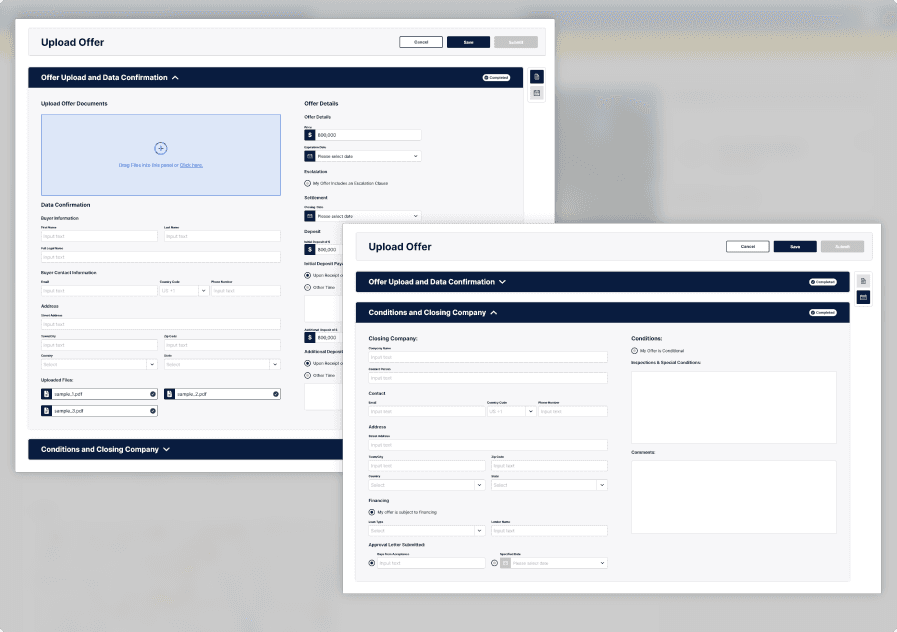
[IMAGE: Uploading an Offer screenshot — 16:10]

Uploading an Offer

One of the biggest challenges I overcame at Openn was the redesign of their offer upload process. It was originally a rudimentary design that relied on navigating to multiple pages to complete.

My updated workflow includes accordions rather than pages to give quick completion feedback to our users and was especially helpful given the simple navigation in the case that users missed fields.

Alongside the accordion design, I also designed it to be used as a modal rather than loading a separate page since we found that users were often frustrated with having to navigate back to their dashboard when they finished.

[IMAGE: Uploading an Offer screenshot — 16:10]

Uploading an Offer

One of the biggest challenges I overcame at Openn was the redesign of their offer upload process. It was originally a rudimentary design that relied on navigating to multiple pages to complete.

My updated workflow includes accordions rather than pages to give quick completion feedback to our users and was especially helpful given the simple navigation in the case that users missed fields.

Alongside the accordion design, I also designed it to be used as a modal rather than loading a separate page since we found that users were often frustrated with having to navigate back to their dashboard when they finished.

[IMAGE: Dashboard Redesign screenshot — 16:10]

Dashboard Redesign

Another additional key feature I designed for Openn was their Dashboard. I intended to create a consolidated area that displayed all agents' property updates and notifications since their last login.

Since our research showed that agents favored designs familiar to them, I decided to implement a stacking banner design, similar to the ones seen on most modern smartphones.

The result was a page that was bold and followed a modern aesthetic but retained the intuitiveness of notification banners that were already well-known by agents.

[IMAGE: Dashboard Redesign screenshot — 16:10]

Dashboard Redesign

Another additional key feature I designed for Openn was their Dashboard. I intended to create a consolidated area that displayed all agents' property updates and notifications since their last login.

Since our research showed that agents favored designs familiar to them, I decided to implement a stacking banner design, similar to the ones seen on most modern smartphones.

The result was a page that was bold and followed a modern aesthetic but retained the intuitiveness of notification banners that were already well-known by agents.

04 — Takeaways

Closing Thoughts & Takeaways

Closing Thoughts & Takeaways

Off the top of my head, I can list a few key aspects of my work that changed with this position. I learned to listen more effectively and was forced to communicate much more than I was used to since my review meetings were large and very opinionated. In the future, I hope to hone that communication to efficiently process criticism and convert it into meaningful design adjustments.

Another big change I dealt with was the pacing of a startup workload. Creating and applying a design process in a busy, industrial setting was difficult at first but eventually gave me the foundation to work on projects back to back so effectively I was often ahead of schedule.

Ultimately, I felt as if I grew here as a designer much more in terms of design theory and structure rather than raw skill. Truthfully, I came here to lift Openn’s design aesthetic into something with a more modern feel while also improving its usability - and I learned just how much of a challenge that can be.

“It’s very easy to be different, but very difficult to be better.”

John Ive

Contact

Don’t wait for inevitable.
Let’s build something irreplaceable.

Get in touch today to align your product vision with current & future design standards.

Build by Rok Verčko

© 2026 Tilak Patel. All rights reserved.